
Customize your dashboard
What this is
You can choose which sections appear on your Home page. Your choices are saved on the device you're using.
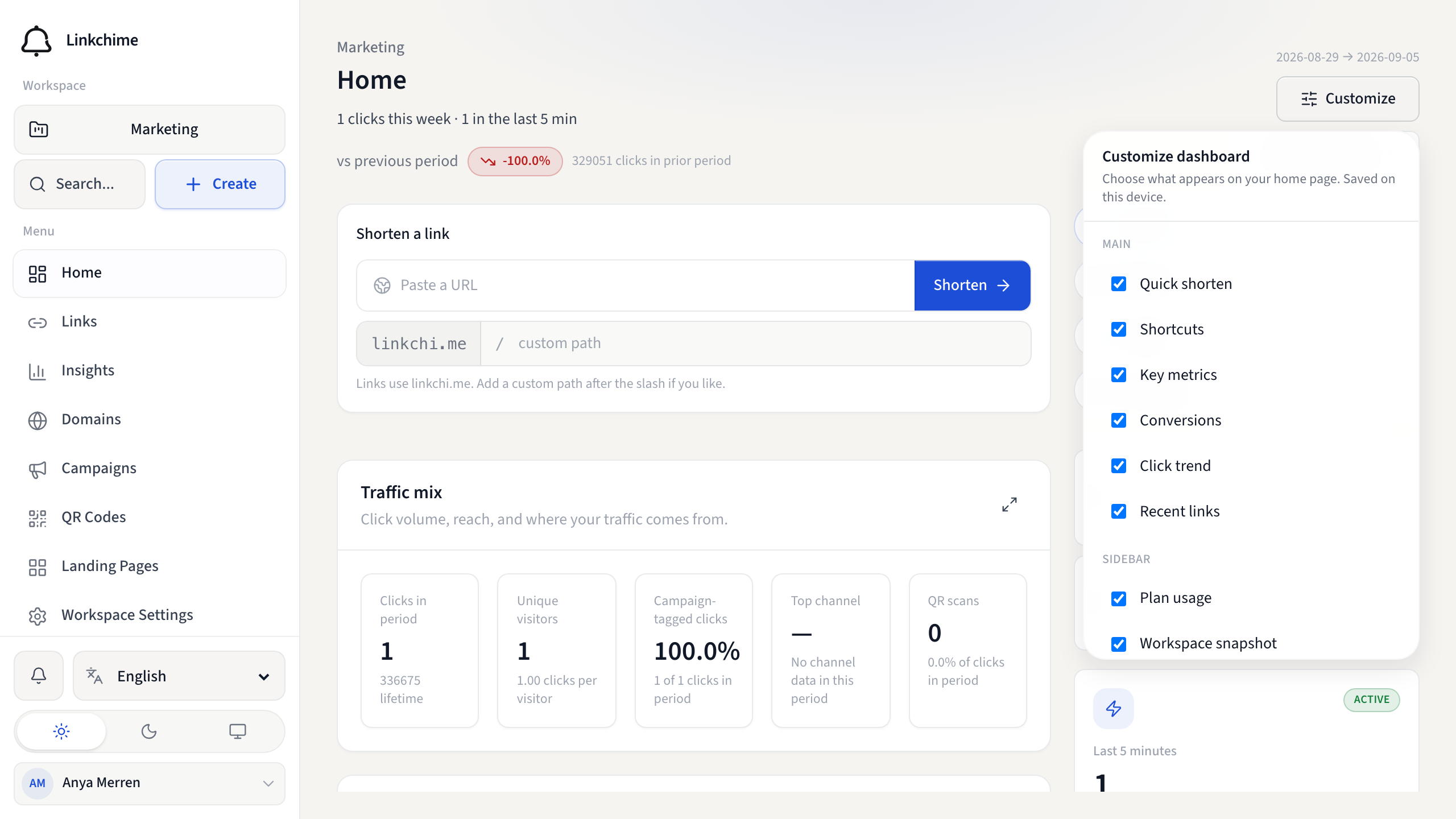
Before you start
- You're signed in and on Home.
Steps
- Open Home.
- Click Customize (near the top of the page).
- In the Customize dashboard panel, turn widgets on or off:
- Quick shorten — paste-and-shorten bar
- Shortcuts — quick links to common pages
- Key metrics — funnel summary
- Conversions — conversion snapshot
- Click trend — chart of daily clicks
- Recent links — your latest links
- Plan usage — usage meters
- Workspace snapshot — link and domain counts
- Engagement pulse — live click activity
- Top links — best performers
- Close the panel. Changes save automatically.
- To restore defaults, open Customize again and click Reset.
What happens next
Your home page shows only the widgets you selected.
Tips
- Customization is per device — your phone and laptop can have different layouts.
- If you don't see Customize, dashboard customization may be disabled on your site.
Related pages
Denemeye hazır mısınız?
Ücretsiz bir hesap oluşturun ve bu rehberleri bir sonraki kampanyanızda kullanın.