
Compare and upgrade
What this is
See every plan side by side with features and limits, then upgrade to a higher plan if you need more.
Before you start
- Self-serve billing must be enabled on this site.
Steps
- Open My Plan.
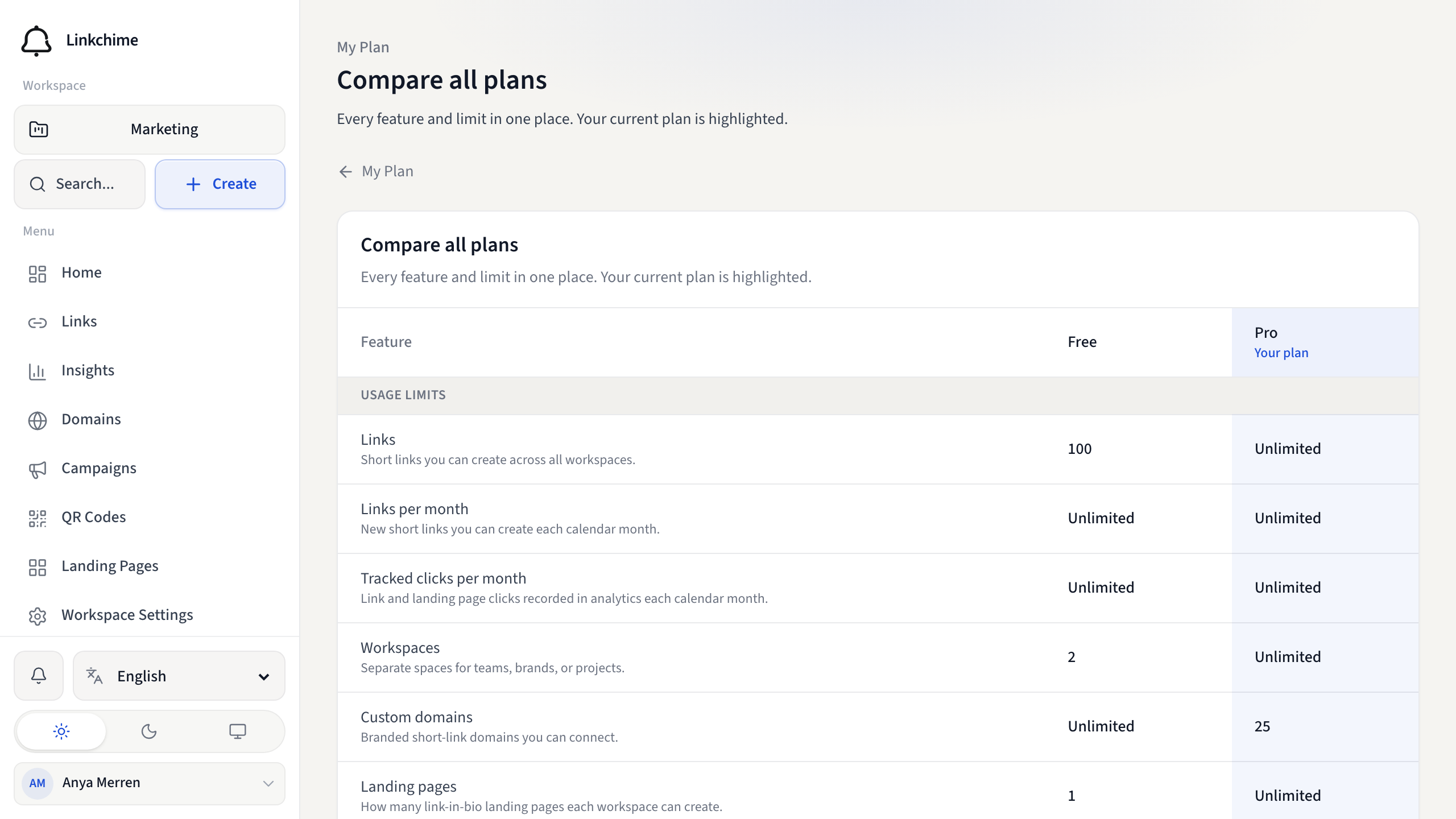
- Click Compare all plans (or go to Plan & usage).
- Review the comparison table:
- Usage limits — links, workspaces, domains, monthly caps
- Links & redirects — custom paths, password, cloak, routing, split tests
- Analytics & reporting — export, scheduled reports, conversion goals
- Landing pages — page limits and advanced themes
- Collaboration — workspace sharing and member limits
- Developer API — API access, keys, import size, rate limits
- Your current plan is highlighted.
- To upgrade, click Upgrade to [plan name].
- Complete payment in Stripe Checkout.
What happens next
After successful payment, your new plan is active immediately with updated limits and features.
Tips
- If checkout is canceled, no changes are made.
- Some sites may direct you to an external pricing page instead of in-app checkout.
Related pages
Denemeye hazır mısınız?
Ücretsiz bir hesap oluşturun ve bu rehberleri bir sonraki kampanyanızda kullanın.