
Interstitial page
What this is
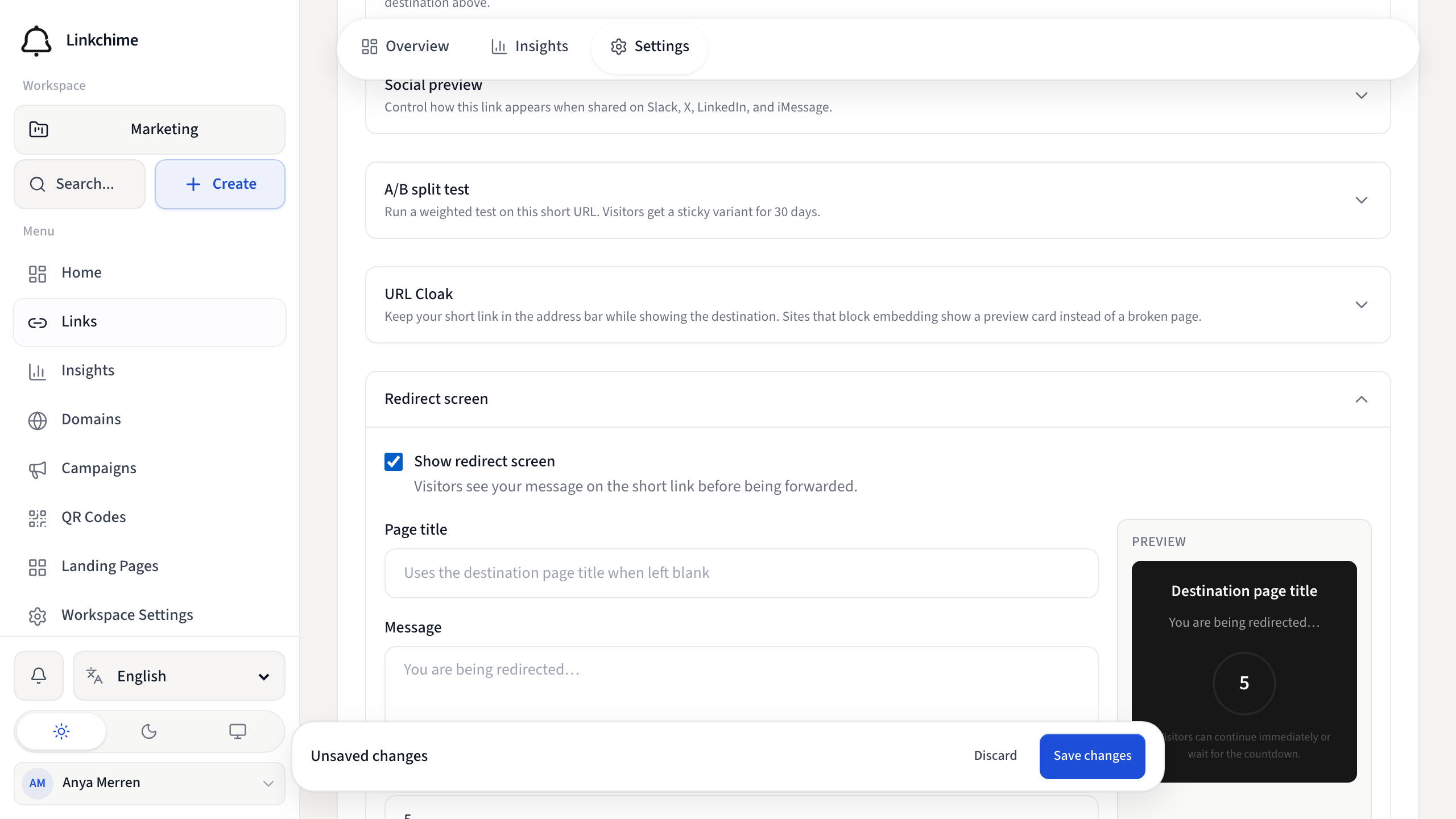
Show visitors a short message and countdown before redirecting them to the destination. Useful for disclaimers or branded transitions.
Before you start
- Interstitial redirect must be available on your plan.
- You have a link open on the Settings tab.
Steps
- Open a link's Settings tab.
- Find Redirect screen and turn on Show redirect screen.
- Set Page title (optional — uses the destination title if blank).
- Add a Message for visitors to read.
- Set the Countdown duration in seconds.
- Click Save changes.
What happens next
Visitors see your message and countdown on the short link URL, then are automatically redirected.
Tips
- Keep messages short and clear.
- A countdown of 3–5 seconds works well for most use cases.
- For a launch that should stop redirecting, use Drop mode instead of a countdown screen.
Related pages
Denemeye hazır mısınız?
Ücretsiz bir hesap oluşturun ve bu rehberleri bir sonraki kampanyanızda kullanın.